Never Forget
IN-V-BAT-AI. Try It.


🎯 Never Forget What Matters.
Trusted automation intelligence from every solved problem. Save time. Reduce stress. Decide smarter.
Subscribe today—because your memory deserves a backup.
$120 per school per year
click to read more

Enter or say keywords, phrases, and numbers using AI voice-to-text, then tap "SEARCH 2"
Apolinario "Sam" Ortega collected knowledge
about
AWS Certified Solution Architect - Associate

List AWS Domain Name Subscription
1. getme.cloud
2. showmehowtosolve.net
3. getmetoday.net
4. howtosolve.org
5. explaintome.org
Information I collected that I thought important to remember to become an
AWS Certified Solution Architect
Because of rapid changes in technology some of these information maybe not valid anymore. But its a good snapshot in time how much knowledge was stored in my brain memory that I can always update. This is also my test that A.I + chatbot can help me learn once (meaning stored in invbat.com cloud) and o.k to forget because I can always go back If I needed my collected knowledge.
1. Amazon Web Services (AWS) is offering free usage tier of MySQL database
2. RDS ? means Relational Database Services
3. VPC ? means Virtual Private Cloud for Sales, VPC for Marketing, VPC for Operation, VPC for Engineering
4. AZ ? means Availability Zone
5. Public end user talk to Web Server not directly to the database . This is another security implementation for securing database. Then web server talk to database like Aurora database, Redshift database, DynamoDB and Storage like S3.
6. Security services or service group in AWS are like firewall to protect database
6.1 Port 22 is assigned to SSH (Secure Shell)
6.1.a Port 23 is assigned to Telnet
6.2 Port 80 is assigned to HTTP
6.3 Port 443 is assigned to HTTPS
6.4 Port 3389 is assigned to RDP (Microsoft Remote Desktop Protocol)
6.5 Port 5666 is assigned to NRPE (Nagios Remote Plug In Executor). Therefore, the connection refused error displays if the NRPE traffic is not traversing a firewall, or if port 5666 of the server is not open.
6.6 Port 5800, 5900 are assigned to TCP/VNC (Transmission Control Protocol/Virtual Network Computing)
6.7 Port numbers in computer networking represent communication endpoints. Ports are unsigned 16-bit integers (0-65535) that identify a specific process, or network service. IANA is responsible for internet protocol resources, including the registration of commonly used port numbers for well-known internet services. Well Known Ports: 0 through 1023. Registered Ports: 1024 through 49151. Dynamic/Private : 49152 through 65535. source - speedguide.net
6.8 Internet Port Number 23 Assigned by IANA(Internet Assigned Number Authority) is for TCP (Transmission Control Protocol), communication end point 23 is listening to Telnet service. Telnet is one of the oldest Internet protocols and the most popular program for remote access to Unix machines. It has numerous security vulnerabilities [RFC 854]
When troubleshooting unknown open ports, it is useful to find exactly what services/processes are listening to them. This can be accomplished in both Windows command prompt and Linux variants using the "netstat -aon" command. We also recommend running multiple anti-virus/anti-malware scans to rule out the possibility of active malicious software. source - speedguide.net
Telnet, by default, does not encrypt any data sent over the connection (including passwords), and so it is often feasible to eavesdrop on the communications and use the password later for malicious purposes; anybody who has access to a router, switch, hub or gateway located on the network between the two hosts where Telnet is being used can intercept the packets passing by and obtain login, password and whatever else is typed with a packet analyzer.
Most implementations of Telnet have no authentication that would ensure communication is carried out between the two desired hosts and not intercepted in the middle.
source: Telnet - Wikipedia
IANA SEARCH PORT
netstat-aon command is a powerful tool for network status diagnostics and monitoring
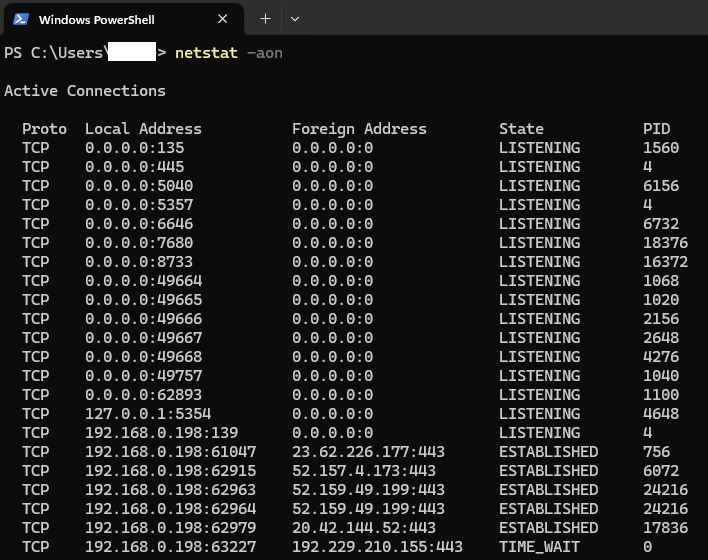
-a: Displays all active connections and listening ports. This includes both TCP and UDP connections.
-o: Shows the owning process ID (PID) associated with each connection. This can be useful for identifying which application is using a particular port.
-n: Displays addresses and port numbers in numerical form, rather than resolving them to hostnames and service names. This can speed up the output and make it easier to read.
-t: Display only TCP connections
-l: List only listening ports
-r: Shows the routing table
-i: Displays network interface statistics
Identify the Process: Each PID corresponds to a specific process running on your system. You can use this PID to find out which application or service is associated with a particular network connection.
Task Manager: On Windows, you can open the Task Manager (Ctrl + Shift + Esc), go to the “Details” tab, and look for the PID to see the name of the process. Sorting the PID column numerically can make it easier to find the specific PID
Command Line Tools: On Linux, you can use commands like ps or top to find more information about the process using the PID. For example, ps -p
To identify the device associated with the IP address 192.168.0.198 on your network, you can follow these steps:
Use the arp -a command to display the ARP table, which shows IP addresses and corresponding MAC addresses of devices on the network.
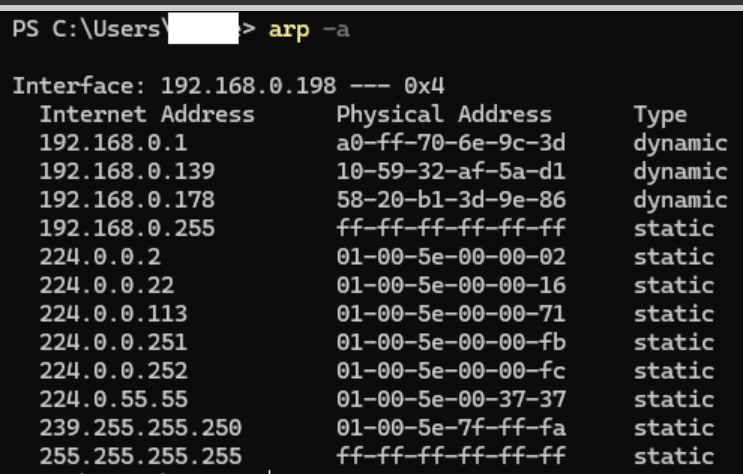
ARP table (Address Resolution Protocol) table is a critical component in computer networking. It maps IP addresses to
MAC addresses, allowing devices on a local network to communicate with each other.
The ARP table stores the mappings between IP addresses and MAC addresses. When a device wants to communicate with another
device on the same local network, it uses the ARP table to find the corresponding MAC address for the target IP address.
Each entry in the ARP table consists of an IP address and its associated MAC address. Dynamic entries are automatically added
and updated by the ARP protocol as devices communicate on the network. Static entries are manually configured and do not change unless
manually updated.
When a device needs to communicate with another device, it sends an ARP request to the network, asking for the MAC
address associated with a specific IP address. The device with the matching IP adress responds with an ARP request,
providing its MAC address. This information is then stored in the ARP table.
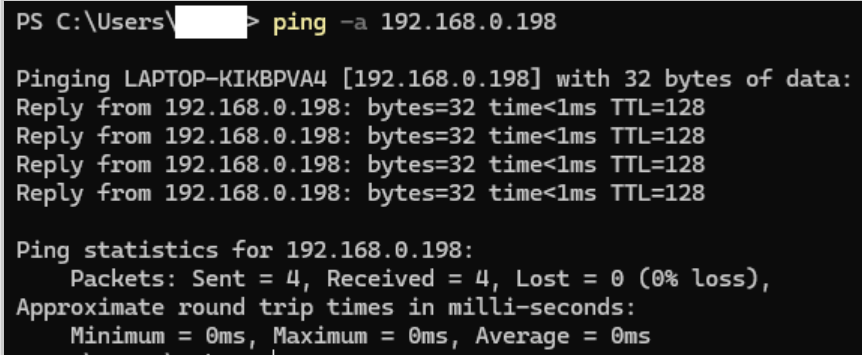
You can also use the ping -a 192.168.0.198 command to get the hostname of the device
7. MySQL default port number is 3306. It is best practice to leave it as a default. The reason is if you accidentally change the port to another number some application that are globally configured for port 3306 for MySQL will be broken meaning they will return error message.
8. AWS RDS by default do automatic database backup and the default day is 7 days. It means if your database was deleted today or got corrupted and not working anymore due to malware you don't need to worry because you know you can restore your database using old good database. Do not set the database backup to 0 (zero day) because it means disable the automatic backup.
9. CLI ? means command line interface
10. AWS EC2 (Amazon Web Service Elastic Compute Cloud) instance do not manage the database. To modify and manage your EC2 database go to RDS to manage your database.
11. Automatic failover ? means when the master database is not in service due maintenance automatic failover means the database query will failover or go to the replica database and your service availability is not affected. Replica database is synchronize to master database. Replica database is read only.
12. ARN ? means Amazon Resource Number
13. Use the DNS connection and not the IP address because IP address do not do automatic failover to replica database. DNS (Domain Name System) is human-friendly. DNS translates human-readable domain names into IP addresses that computers use to identify each other on the network. This makes it easier for users to remember and access websites. DNS can distribute traffic across multiple servers, improving the performance and reliability of websites. This helps prevent any single server from becoming overhelmed with too much traffic. DNS provides redundancy by having multiple DNS servers that can respond to queries. If one server fails, another can take over, ensuring availability of the service. DNS allows for easy updates and changes to domain names and IP addresses without disrupting the service. DNS can direct users to the nearest server based on their geographic location, improving the speed and efficiency of content delivery.
14. If your Database mainly used in online analytical processing (OLAP) and get updated every 30 days for example , it is possibly o.k. to set the back up setting in zero (0) day. Why ? zero day setting means no automatic back up. It is still o.k because the source data comes from other data source therefore there is no need to create a back up. Another advantage of zero (0) day backup setting is it increases the performance of your online analytical processing (OLAP).
15. Restore to point in time, it means if you know the point in time database was deleted or corrupted, you can restore the database from that point in time.
16. myDatabase_ss ? the suffix ss means SnapShot. Snapshot database is like a manual backup. It takes time if the database is big.
17. The benefit of learning how to create a snapshot of database as your backup database is you can share your snapshot database to different availability zone or different region for localization
18. When your database is taking more time to process or return answer to query it could be many users are connected to your database. To speed up the return of your search query you watch your database default basic performance monitoring dashboard and check how many user are connected to your database (look for DB connection dashboard). If many connected user are only read access user, then to solve the speed performance problem, you can add replica database to offload some processing from the master database.
19. Flat file database ? it means similar to comma separated value (csv) files from Excel or other similar file that contains record of information
20. Relational database, think of it as a lot of tables of datasets that are link together by primary key id and foreign key id. Primary key id for example is itemID under product table. It is a unique ID to retrieve any data from the Product table database. Foreign key id is a unique id that associates, is related to, linked to other table for example OrderID is a foreign key use to link the Order table database of record. Another example of foreign key, CustomerID is a foreign key of order table to link the Customer table database.
21. Product Table
22. Order Table
23. Customer table
24. Terminology use in table database or tabular database literature . (tabular database compare to columnar database ?)
25. Rows - row of records, imagine the Excel row. It contains the data or record. The fancy term for rows is tuples
26. Columns - the name of the record or data, It is also called field name , attributes name, properties name. See above example
27. Tables - are also called relations that is why it is called relational database
28. Tables - are also called entities or objects
29. View - are the result of joining table to answer business question. We use SQL to join table so that it can answer specific business question. For example show me the list of top ten product with monthly sales over $10,000. View table is a curated table, pre-built joined table, data pipeline leading to a dashboard to answer specific important business question.
30. Aggregation - another term for joining tables is data aggregation. This is the hard part because database primary key id and foreign key id are not always available in siloed legacy databases. In order to aggregate or join the table from several siloed legacy database you need to extract them and place in common platform so you can join them in order to answer new ad-hoc business question.
31. Normalization - this is a hard to explain terminology in relational database. But the concept is simple. You do normalization when you evaluate column field names, attributes or properties of a Table database. For example take a Customer Table : When you evaluate the field name, or attributes or properties, you will ask the question does it make sense to include First_Name, Last_Name, Address, Telephone Number, SSN, E-mail and so on.
32. 1 NF? means First normalization format review of column field names, properties or attributes
33. 2 NF? means second normalization format review of column field names, properties or attributes
34. What is the use of this knowledge of 4 NF ? It is important to know because it affects the read time from database when you are doing query from the table database. Usually at 4 NF the read time takes longer because your are gathering or joining more column field names. When you are writing or appending your table 4NF is much faster because you are not writing redundant data.
35. AWS EC2 Instance database - this database solution takes more steps . step 1. You launch an instance of database step 2. Install the database service step 3. Open appropriate ports in security group step 4. connect to the database
36. AWS hosted service database much easy solution. step 1. You launch the database step 2. Connect to the database
37. Why bother learning EC2 instance database ? answer: Because EC2 instance is user defined, it can be used to install you old version of your database server in order for your application to keep serving your customer while you are migrating your old version of database server to newer version
38. Explain why it is better to use managed database service? Answer: Because you don't need to worry about database software version update and security patches update. They are done automatically by AWS hosted service
39. High availability of database - Solution 1 is clustering of database server. You are provisioning multiple database server. In AWS terminology Multiple server means multiple instances
40. Think of clustering as grapes fruit. Grapes fruit has many individual grape but connected on one stem. Individual grape represent your individual database instance connected to one network or stem.
41. When you read or hear the word clustering of database server, you must remember four things 1. multiple database server (multiple database instances) 2. One master database but have multiple replication 3. It increases database service availability 4. It do automatic failover to replica database.
42. Scalability - increase storage instances, processing memory and network capacity.
43. a read replica can be used to offload read only operation coming from user that has read only access privilege
44. RDS database support "at rest " encryption . "At rest" encryption must be implemented at creation time of database or at restoration time.
45. CRUD in database ? mean create , read, update, and delete task
46. Aurora database is built by AWS. It is a relational database. It is optimize for online transaction processing (OLTP) . Compare OLTP to online analytical processing (OLAP). OLTP database like Aurora are usually the critical database that needs to have a backup. While OLAP database are usually data extract use for analytical purposes to answer specific business question like compliance reporting
47. Aurora database default is 10 GB and it increment by 10 GB automatically up to 64 TB. Aurora can have 15 replica with automatic failover and can support 5 MySQL with no automatic failover.
48. Redshift database is another database built by AWS. It is used for data warehouse application. OLAP databases are usually stored in data warehouse databases like Redshift database.
49. Redshift single node can handle up to 160 TB of data. If your data requires more than 160 TB , you need to provision multiple node.
50. Multiple node has a leader node . The leader node handle the connection and queries. While the multiple node do data storage, execute queries and do calculation. Redshift database is very fast. Explain why Redshift is a very fast database? Redshift is a columnar database. Columnar database is like Excel spreadsheet. Because it is not joining tables (for tabular database) , it just reading, it read very fast which is very important in any OLAP.
51. Redshift also capable of doing data compression , another explanation for its performance speed. It allows massively parallel processing (MPP).
52. Redshift support SSL transit encryption. The encryption key is managed through AWS key management.
53. Redshift operates in one availability zone. Then you can take a snapshot backup and there restored the backup snapshot in different AZ.
54. DynamoDB is another database built by AWS. It is a NoSQL database service meaning it is not a relational database. One of its advantage is millisecond latency at any scale. At any scale means whether I have 100,000 user or 5 million user, the DynamoDB will response to serve the query result in millisecond delay. This could be INVBAT.COM - A.I. + Chatbot future database platform to serve growing user.
55. DynamoDB uses solid state drive (SSD) storage and the database are spread across 3 distinct data centers.
56. DynamoDB uses two read consistency type. number 1 is eventual consistent read. This read could have a delay of few seconds. The second one is strongly consistent read. This type of read has a few millisecond delays.
57. Amazon online store uses DynamoDB.
58. LDAP (Lightweight Directory Access Protocol) authentication is a process used to verify the identity of users by checking their credentials (username and password) against data stored in an LDAP directory server. Here's a brief overview of how it works:
1. Client-Server Model: The client, typically an application or service, initiates the authentication process by sending a request to the LDAP server.
2. Credentials Verification: The LDAP server receives the request and verifies the provided credentials against its database.
3. Access Control: If the credentials match, the user is granted access to the requested resources. If not, access is denied.
LDAP is commonly used in conjunction with directory services like OpenLDAP or Microsoft Active Directory to manage user information and access permissions. It supports various authentication methods, including Kerberos, single sign-on (SSO), and Secure Sockets Layer (SSL).
59. RADIUS (Remote Authentication Dial-In User Service) is a networking protocol that provides centralized authentication, authorization, and accounting (AAA) management for users who connect and use a network service. Here's a brief overview of how RADIUS server authentication works:
1. Client-Server Model: The client, typically a network access server (NAS), sends an access request to the RADIUS server.
2. Credentials Verification: The RADIUS server receives the request and verifies the provided credentials (username and password or security certificate) against its database.
3. Access Control: If the credentials are valid, the RADIUS server grants access to the requested resources. If not, access is denied.
RADIUS is commonly used for authenticating users and devices to wired and wireless networks, as well as VPNs. It supports various authentication methods, including PAP, CHAP, and EAP.
60. Password Authentication Protocol (PAP) is a simple, password-based authentication method used in networking environments, particularly within the context of the Point-to-Point Protocol (PPP). Here's a brief overview of how PAP works:
1. Two-Way Handshake: PAP uses a two-way handshake to authenticate users. The client sends a username and password to the server in an authentication-request packet.
2. Credentials Verification: The server verifies the provided credentials against its database. If the credentials match, the server sends an authentication-ack response, and the connection is established. If the credentials do not match, the server sends an authentication-nak response, and the connection is denied.
Security Considerations:
- Plain Text Transmission: PAP sends data in plain text, making it vulnerable to packet sniffing attacks where bad actors can intercept and view the PPP session.
- Weak Authentication Scheme: Due to its simplicity and lack of encryption, PAP is considered a weak authentication scheme. More secure alternatives like CHAP (Challenge-Handshake Authentication Protocol) are often used instead.
61. Extensible Authentication Protocol (EAP) is an authentication framework commonly used in network and internet connections, particularly for wireless networks and VPNs. Here's a brief overview of how EAP works:
1. Authentication Framework: EAP is not a specific authentication method but a framework that supports multiple authentication methods, known as EAP methods.
2. EAP Methods: There are many EAP methods, including EAP-TLS (Transport Layer Security), EAP-MSCHAPv2 (Microsoft Challenge Handshake Authentication Protocol version 2), EAP-TTLS (Tunneled Transport Layer Security), and more. Each method provides different levels of security and is suitable for various use cases.
3. Secure Transmission: EAP provides a standardized way to transmit authentication credentials securely over the network.
EAP is widely used in wireless networks (e.g., Wi-Fi) and supports secure authentication mechanisms like WPA and WPA2.
62. Wi-Fi Protected Access (WPA) is a series of security protocols designed to safeguard Wi-Fi networks by providing secure authentication and encryption. Here's a brief overview of the different versions of WPA:
1. WPA (WPA1):
- Introduced: 2003
- Encryption: Uses Temporal Key Integrity Protocol (TKIP) to dynamically generate a new 128-bit key for each packet, enhancing security compared to WEP.
- Authentication: Supports authentication servers like RADIUS.
2. WPA2:
- Introduced: 2004
- Encryption: Uses Advanced Encryption Standard (AES) for stronger encryption.
- Authentication: Includes support for both personal (WPA2-Personal) and enterprise (WPA2-Enterprise) modes.
3. WPA3:
- Introduced: 2018
- Encryption: Provides enhanced security features, including stronger encryption and protection against brute-force attacks.
- Authentication: Supports WPA3-Personal, WPA3-Enterprise, and Wi-Fi Enhanced Open for public networks.
WPA3 is the latest and most secure version, offering significant improvements over its predecessors, such as better protection for weak passwords and forward secrecy.
63. A MAC (Media Access Control) address is a unique identifier assigned to a network interface controller (NIC) for use as a network address in communications within a network segment. Here are some key points about MAC addresses:
1. Format: A MAC address is typically represented as six groups of two hexadecimal digits, separated by hyphens, colons, or without a separator (e.g., 00:1A:2B:3C:4D:5E).
2. Purpose: It uniquely identifies each device on a network, ensuring that data packets are delivered to the correct destination.
MAC address are used for network communication at the data link layer (layer 2) of the OSI model. They help devices on the
same local network segment to identify and communicate with each other.
3. Assignment: MAC addresses are usually assigned by the device manufacturer and are often referred to as the burned-in address.
4. Usage: Commonly used in IEEE 802 networking technologies, including Ethernet, Wi-Fi, and Bluetooth.
5. Static Nature: Unlike IP addresses, which can change, MAC addresses are usually fixed and assigned by the manufacturer
of the network interface card.
64. TCP (Transmission Control Protocol)
1. Connection-Oriented: TCP establishes a connection between the sender and receiver before data transmission begins. This is done through a process called the three-way handshake.
2. Reliability: TCP ensures reliable data transfer by using acknowledgments and retransmissions. If a packet is lost or corrupted, TCP will retransmit it.
3. Flow Control: TCP uses flow control mechanisms to prevent network congestion and ensure that the sender does not overwhelm the receiver.
4. Error Checking: TCP includes error-checking mechanisms to ensure data integrity.
5. Use Cases: TCP is commonly used for applications where data integrity and reliability are crucial, such as web browsing (HTTP/HTTPS), email (SMTP), and file transfers (FTP).
UDP (User Datagram Protocol)
1. Connectionless: UDP does not establish a connection before data transmission. It sends data packets (datagrams) without ensuring that they reach the destination.
2. Unreliable: UDP does not guarantee the delivery of data packets. There are no acknowledgments or retransmissions, so packets may be lost or arrive out of order.
3. No Flow Control: UDP does not have flow control mechanisms, which can lead to network congestion if the sender transmits data too quickly.
4. Minimal Error Checking: UDP has minimal error-checking capabilities compared to TCP.
5. **Use Cases**: UDP is suitable for applications where speed is more critical than reliability, such as live streaming, online gaming, and voice over IP (VoIP).
65. The TCP/IP protocol suite is the foundation of the internet, enabling devices to communicate over networks. It consists of two main protocols: **Transmission Control Protocol (TCP)** and **Internet Protocol (IP)**. TCP ensures reliable data transmission by managing packet delivery, error checking, and reordering. IP handles addressing and routing, ensuring data packets reach their destination. Together, they break data into packets, transmit them, and reassemble them at the destination. This model is divided into four layers: **Application, Transport, Internet, and Link. TCP/IP's robustness and scalability make it essential for modern networking.
.
IN-V-BAT-AI helps you recall information on demand—even when daily worries block your memory. It organizes your knowledge to make retrieval and application easier.
Source: How People Learn II: Learners, Contexts, and Cultures
.
How can IN-V-BAT-AI be used in classrooms ?
IN-V-BAT-AI is a valuable classroom tool that enhances both teaching and learning experiences. Here are some ways it can be utilized:
☑️ Personalized Learning : By storing and retrieving knowledge in the cloud, students can access tailored resources and revisit
concepts they struggle with, ensuring a more individualized learning journey.
☑️ Memory Support : The tool helps students recall information even when stress or distractions hinder their memory, making it
easier to retain and apply knowledge during homework assignments or projects.
☑️ Bridging Learning Gaps : It addresses learning loss by providing consistent access to educational materials, ensuring that
students who miss lessons can catch up effectively.
☑️ Teacher Assistance : Educators can use the tool to provide targeted interventions to support learning.
☑️ Stress Reduction : By alleviating the pressure of memorization, students can focus on understanding and applying concepts,
fostering a deeper engagement with the material.
🧠 IN-V-BAT-AI vs. Traditional EdTech: Why "Never Forget" Changes Everything
📚 While most EdTech platforms focus on delivering content or automating classrooms, IN-V-BAT-AI solves a deeper problem: forgetting.
✨Unlike adaptive learning systems that personalize what you learn, IN-V-BAT-AI personalizes what you remember. With over 504 pieces of instantly retrievable knowledge, it's your cloud-based memory assistant—built for exam prep, lifelong learning, and stress-free recall.
📧 No coding, no hosting—just email what you want to remember
📱 Live within 24 hours, optimized for mobile and voice search
💸 $30/year for 504 personalized memory recall sites (just 6¢ each)
"🧠 Forget less. Learn more. Remember on demand."
That's the IN-V-BAT-AI promise.
🧠 Augmented Intelligence vs Artificial Intelligence
Understanding the difference between collaboration and automation

🔍 Messaging Contrast
Augmented Intelligence is like a co-pilot: it accelerates problem-solving through trusted automation and decision-making, helping you recall, analyze, and decide — but it never flies solo.
Artificial Intelligence is more like an autopilot: designed to take over the controls entirely, often without asking.
💡 Why It Matters for IN-V-BAT-AI
IN-V-BAT-AI is a textbook example of Augmented Intelligence. It empowers learners with one-click recall, traceable results, and emotionally resonant memory tools. Our “Never Forget” promise isn't about replacing human memory — it's about enhancing it.

Note: This is not real data — it is synthetic data generated using Co-Pilot to compare and contrast IN-V-BAT-AI with leading EdTech platforms.


.





.
.
🎉 72,133 Visitors 11/14/25
IN-V-BAT-AI just crossed 72,133 organic visits—no ads, just curiosity and word-of-mouth.
Every visit is a step toward forgetting less, recalling faster, and remembering on demand.
Never Forget. Learn on demand.
🔗 SubscribeTry AI website hosting
$30 per year
| Year | Top 10 countries | Pages visited |
| 2023 | 1. USA 2. Great Britain 3. Germany 4. Canada 5. Iran 6. Netherlands 7. India 8. China 9. Australia 10. Philippines | 127,256 Pages / 27,541 Visitors |
| 2024 | 1. USA 2. China 3. Canada 4. Poland 5. India 6. Philippines 7. Great Britain 8. Australia 9. Indonesia 10. Russia | 164,130 Pages / 40,724 Visitors |
| Daily Site Visitor Ranking 11/14/2025 | 1. Israel 2. USA 3. China 4. Vietnam 5. Japan 6. India 7. Australia 8. Argentina 9. Brazil 10. Ukraine | Year to Date 204,611 Pages / 72,133 Visitors |
Data source: Advanced Web Statistics 7.8
Approximately between 2.3 and 2.5 million schools globally, according to the latest available data from government and education ministry reports.
🔗 The challenges schools face: 2025/2026 🔗 USA ~ Public 98,500 ~ Private 30,000 ~ Total 128,500 🔗 Canada ~ Public 15,500 ~ Private 2,000 ~ Total 17,500 🔗 Brazil ~ Public 138,000 ~ Private 40,000 ~ Total 178,000 🔗 Vietnam ~ Public 42,000 ~ Private 8,000 ~ Total 50,000 🔗 China ~ Public 217,200 ~ Private 152,800 ~ Total 470,000 🔗 India ~ Public 1,022,386 ~ Private 335,844 ~ Total 1,358,230 🔗 Japan ~ Public 30,240 ~ Private included ~ Total 30,240 🔗 Morocco ~ Public 20,600 ~ Private 6,300 ~ Total 26,900 🔗 Indonesia ~ Public 390,718 ~ Private included ~ Total 390,718 🔗 Philippines ~ Public 47,831 ~ Private 13,000 ~ Total 60,831 🔗 Great Britain ~ Public 29,202 ~ Private included ~ Total 29,202 🔗 Australia ~ Public 9,653 ~ Private included ~ Total 9,653 🔗 Russia ~ Public 39,070 ~ Private included ~ Total 39,070 🔗 Germany ~ Public 31,039 ~ Private included ~ Total 31,039 🔗 Poland ~ Public 36,291 ~ Private included ~ Total 36,291 🔗 Iran ~ Public 80,000 ~ Private included ~ Total 80,000 🔗 France ~ Public 58,100 ~ Private included ~ Total 58,100 🔗 Mexico ~ Public 132,505 ~ Private included ~ Total 132,505