.
👈


📱 Launch 504 Custom Educational Websites for Just $30/Year
No coding. No hosting. Just results.
Empower your classroom, tutoring service, or educational platform with 200 custom calculators and 304 math exam tutor sites—all hosted and maintained for you. That’s 504 personalized tools for just 6 cents each per year.
✅ Zero technical setup
Just email us what you want updated—we’ll handle the rest.
✅ Instant deployment
Your tools go live fast, optimized for mobile and voice search.
✅ Built for learning
Designed to support memory recall, personalized study, and exam prep.
🎯 Who It’s For
Teachers who want ready-to-use digital tools
Tutors scaling their services without tech overhead
Students needing reliable, on-demand study aids
Anyone who believes learning should be accessible and affordable
Never forget. Always be ready.
With IN-V-BAT-AI, your knowledge lives in the cloud—ready when you are.

IN-V-BAT-AI solution to forgetting! No coding. No website hosting.
Remember on demand is now possible!

Using AI - Voice to Text Keyword, Phrases or Number Type here > tap SEARCH 2
Excel Things to Remember
.
Bar Code and Excel
.
Excel Short Cut Keyboard
.
Show me how to use Index and Match function in Excel
.
Excel VLOOKUP Function
.
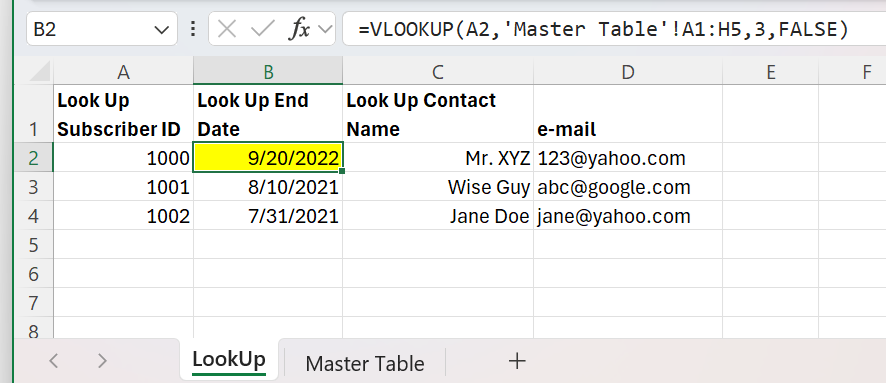
.
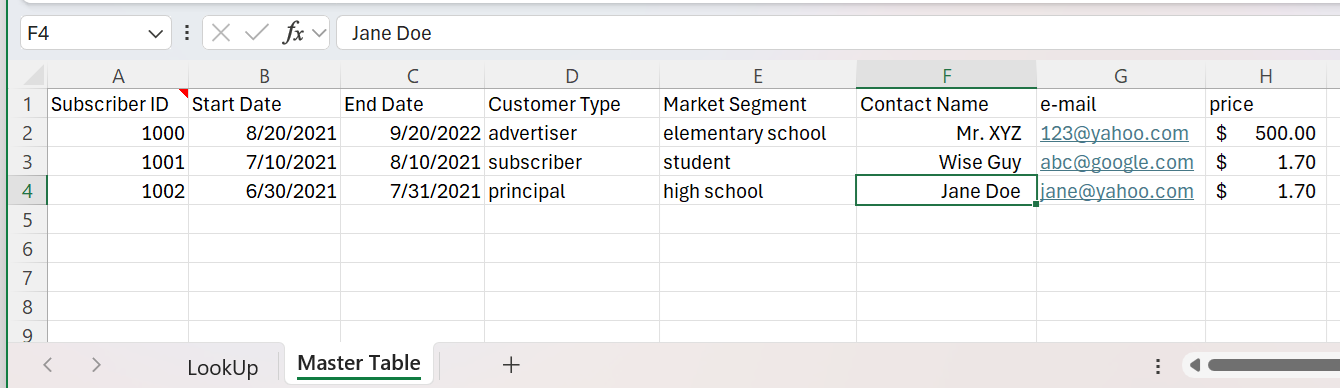
Excel Combining Two Cells
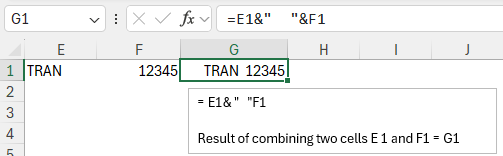
Excel Combining Four Cells
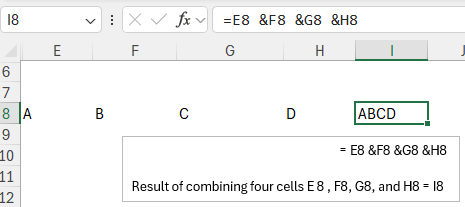
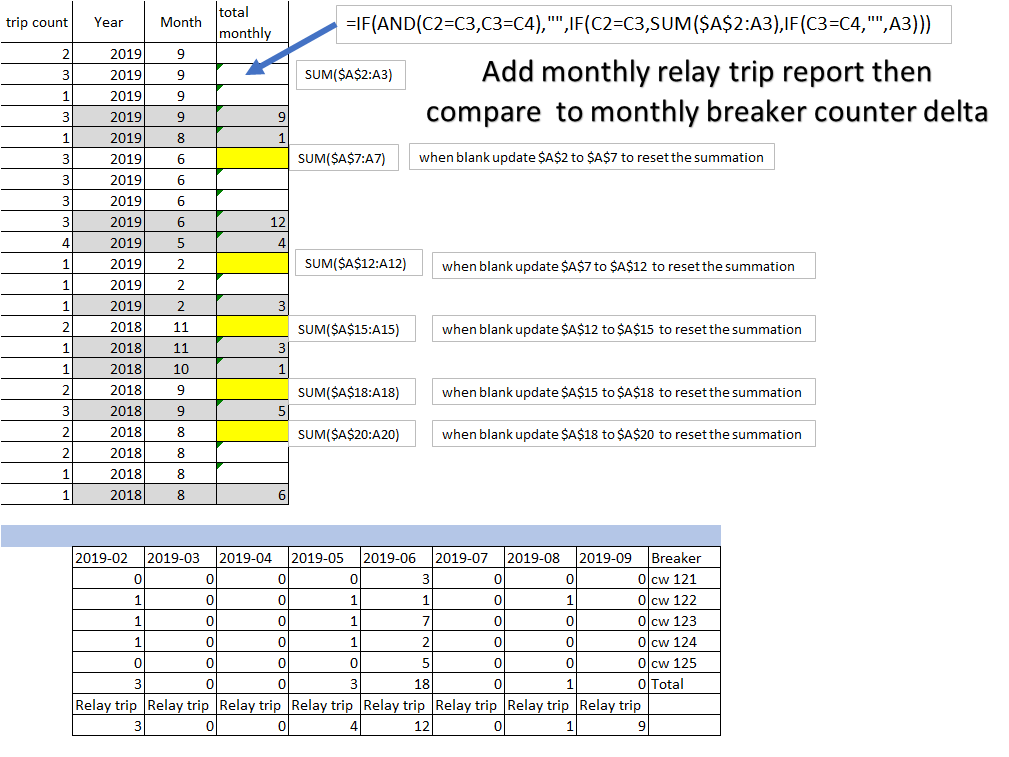
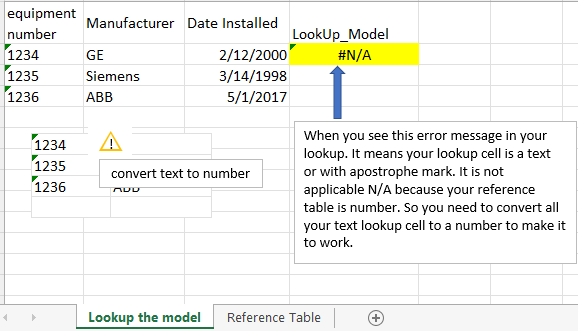
VLookUp Error Message
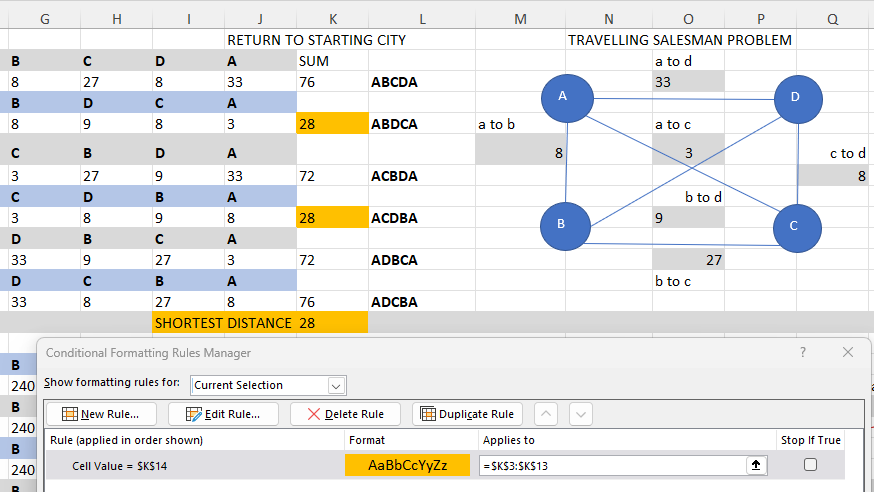
Conditional Formatting
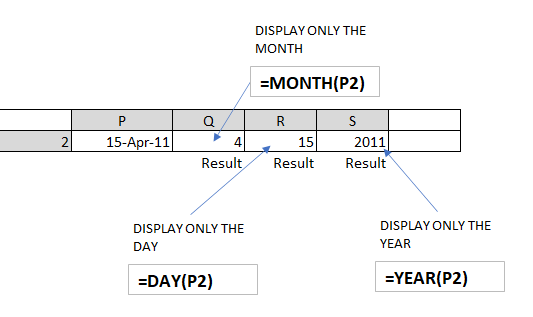
Excel Date Format
Things to remember 1: Convert 1/1/2008 to Excel serial number format. Have you done it before? If yes, then tell me how you will convert 1/1/2008 to serial number format.
Answer: In Excel enter 1/1/2008. Next right click the cell. Next select format cells. Next make sure the tab is in number. Next select general and click OK. You will get the serial number equivalent of 1/1/2008 starting from January 1, 1900 as serial number 1.
Things to remember 2: Compute the total number of days between two dates in Excel. Have you done it before? If yes, then tell me how you will compute the total number of days between two dates in Excel.
Answer: Enter in Excel
EndDate = 3/7/2011
StartDate = 8/19/1996
Use the Days() function to compute the number of days between two dates.
=Days(EndDate, StartDate)
.
IN-V-BAT-AI helps you to remember on demand even if your memory recall is block by too much worries of daily life. It helps you to organize knowledge in ways that facilitate retrieval and easy to use immediately.
Source: How People Learn II: Learners, Contexts, and Cultures
.
How can IN-V-BAT-AI be used in classrooms ?
The IN-V-BAT-AI solution can be a valuable tool in classrooms, enhancing both teaching and learning experience. Here are some ways it can be utilized:
⋆ Personalized Learning : By storing and retrieving knowledge in the cloud, students can access tailored resources and revisit
concepts they struggle with, ensuring a more individualized learning journey.
⋆ Memory Support : The tool helps students recall information even when stress or distractions hinder their memory, making it
easier to retain and apply knowledge during homework assignments or projects.
⋆ Bridging Learning Gaps : It addresses learning loss by providing consistent access to educational materials, ensuring that
students who miss lessons can catch up effectively.
⋆ Teacher Assistance : Educators can use the tool to provide targeted interventions to support learning.
⋆ Stress Reduction : By alleviating the pressure of memorization, students can focus on understanding and applying concepts,
fostering a deeper engagement with the material.
.





.
.
Try AI website hosting
$30 per year
| Year | Top 10 countries | Pages visited |
| 2023 | 1. USA 2. Great Britain 3. Germany 4. Canada 5. Iran 6. Netherlands 7. India 8. China 9. Australia 10. Philippines | 127,256 Pages / 27,541 Visitors |
| 2024 | 1. USA 2. China 3. Canada 4. Poland 5. India 6. Philippines 7. Great Britain 8. Australia 9. Indonesia 10. Russia | 164,130 Pages / 40,724 Visitors |
| Daily Site Visitor Ranking 7/22/2025 | 1. USA 2. India 3. Canada 4. Latvia 5. Iran 6. Russia 7. Lithuania 8. Poland 9. Brazil 10. Chile | Year to Date 110,497 Pages / 33,879 Visitors |
Data source: Advanced Web Statistics 7.8