


Advertisement

Advertisement
How do you like the idea of NOT saying " Oh I forgot, let me get back to you. "

Advertisement
INVBAT.COM - AI revolutionizing education and how to remember using augmented intelligence.
Try typing or saying I need the quadratic formula
Try typing or saying get me the quadratic formula
Try typing or saying show me the quadratic formula
ASK WHAT YOU NEED. TRY I NEED QUADRATIC EQUATION
AI Natural Language Query makes one click search now possible
Enter your access code above or ask what you need
INVBAT.COM - A.I. + CHATBOT voice search for formula , calculator, reviewer, work procedure and frequently asked questions (FAQ). It is useful immediately and on demand using your smartphone, notebook, tablet, laptop or desktop computer. Helping you to learn faster and 98% never forget.
INVBAT.COM - AI + CHATBOT is a personalized natural language search and information retrieval augmented intelligence service provider. We deliver immediate usefulness at affordable cost to our subscriber such as students, teachers, parents, and employees to help them remember what they stored in the cloud in one or fewer click using their smartphone, tablet, laptop, desktop computer, and smart tv.

Advertising rate $375 per year
Additional bonus if your school , community college, and university advertise, all your students and teachers will get free personal memory assistant chatbot for one month.
Advertise on this webpage. Use PayPal
After payment e-mail admin@invbat.com your advertising website link or your You Tube link and we will insert them on this webpage.

# Author : Apolinario (Sam) Ortega - founder of invbat.com-A.I + chatbot <admin@invbat.com)
# Date created: 6/15/2020

# license : BSD 3 clause

# comment : Lesson 19 is my attempt to understand how pandas implement the input/output of data  i/o  api
# pd.read_csv() function to convert .csv data input to panda format output [this is a data reader function]
# pd.to_csv() function to convert pandas data input to .csv format output [ this is a data writer function]
#
# pd.read_excel() function to convert .xlsx data input to panda format output [this is a data reader function]
# pd.to_excel() function to convert pandas data input to .xlsx format output [ this is a data writer function]
#
# pd.read_json() function to convert .json data input to panda format output [this is a data reader function]
# pd.to_json() function to convert pandas data input to .json format output [ this is a data writer function]
#
# pd.read_html() function to convert .html data input to panda format output [this is a data reader function]
# pd.to_html() function to convert pandas data input to .html format output [ this is a data writer function]
#
# for Hadoop file
# pd.read_hdf() function to convert .hdf data input to panda format output [this is a data reader function]
# pd.to_hdf() function to convert pandas data input to .hdf format output [ this is a data writer function]
#
# for R
# pd.read_feather() function to convert .feather data input to panda format output [this is a data reader function]
# pd.to_feather() function to convert pandas data input to .feather format output [ this is a data writer function]
#
# for Hadoop file
# pd.read_parquet() function to convert .parquet data input to panda format output [this is a data reader function]
# pd.to_parquet() function to convert pandas data input to .parquet format output [ this is a data writer function]
#
# for Stata software - general purpose statistical package for research, economics,political science
# pd.read_stata() function to convert .dta data input to panda format output [this is a data reader function]
# pd.to_stata() function to convert pandas data input to .dta format output [ this is a data writer function]
#
# for SAS data input
# pd.read_sas() function to convert .sd2 data input to panda format output [this is a data reader function]
#
# for IBM
# pd.read_spss() function to convert .spss data input to panda format output [this is a data reader function]
#
# for Python format
# pd.read_pickle() function to convert .pickle data input to panda format output [this is a data reader function]
# pd.to_pickle() function to convert pandas data input to .pickle format output [ this is a data writer function]
#
# for sql
# pd.read_sql() function to convert .sql data input to panda format output [this is a data reader function]
# pd.to_sql() function to convert pandas data input to .sql format output [ this is a data writer function]
#
# for Google Big Query file
# pd.read_gbq() function to convert .gbq data input to panda format output [this is a data reader function]
# pd.to_gbq() function to convert pandas data input to .gbq format output [ this is a data writer function]
#

import pandas as pd
import numpy as np
import seaborn as sns
import matplotlib.pyplot as plt

# comment # Do shift + enter
# comment : Show me how to use pd.read_csv() function

# pd.read_csv('/Users/invbat/projects/tips.csv')
List_All = pd.read_csv('/Users/invbat/projects/tips.csv')

# Give me the list of 10 rows  using .head(10) function, list of 20 rows , list of 60 rows
# Most of the business question is asking for give me the report of top 10 product or top 60 products
# pandas dataframe can list up to 60 rows.

List_All.head(10)

# comment # Do shift + enter
# comment : I want you to show me the 10 least saleable products. It means from your sorted list, report the last
# 10 record. Pandas has .tail(20) function that can do that data extraction.
# .tail function display clearly 60 records
List_All.tail(10)

# comment # Do shift + enter
# The dataframe column name or fieldname must be sorted first. See next code. sort the total_bill in descending order.
# comment : I want to sort by descending order the total bills and by sex. Show me how to do it

List_All.sort_values(by=['total_bill', 'sex'], ascending=False).head()

# comment # Do shift + enter
# comment : Show me only the top 5 total bills generated by male customer. Solution use .head() 5 records is the default
# comment : Now I want the list of top 10 total bills generated by male customer. Solution .head(10). See next code
# comment : I want to sort by descending order the total bills and by sex. Show me how to do it
# comment : Show me the top 20 total bills generated by male customer. Solution see code below
List_All.sort_values(by=['total_bill', 'sex'], ascending=False).head(20)

# comment # Do shift + enter

# comment : the code did not comply with the requirements top 20 male customer highest total bills. See next code
# comment : Show me the top 20 male customer generated and their top 20 total bills. Solution see code below
List_All.sort_values(by=[ 'sex','total_bill'], ascending=False).head(20)

# comment # Do shift + enter

# comment : the code now comply with the requirements specified above.
# I want you to rename the column name of the CSV as 'Check_Bill' , 'Tax' , 'Gender' ,'Smoker',
# 'Day', 'Meal_Time' ,'Table_Size'
# Show me how to do it

pd.read_csv('/Users/invbat/projects/tips.csv', names=[ 'Check_Bill' , 'Tax' , 'Gender' ,'Smoker',
                                                    'Day', 'Meal_Time' ,'Table_Size' ], header=0)

# comment # Do shift + enter
# I want you to rename the column name of the CSV as 'Check_Bill' , 'Tax' , 'Gender' ,'Smoker',
# 'Day', 'Meal_Time' ,'Table_Size'
# Show me how to do it . Next I want you to show me how to save this to tip_new.csv

tip_new = pd.read_csv('/Users/invbat/projects/tips.csv', names=[ 'Check_Bill' , 'Tax' , 'Gender' ,'Smoker',
                                                    'Day', 'Meal_Time' ,'Table_Size' ], header=0)
# make sure you add index=False because you will have Unnamed: Column when you display your new tip_new.csv
tip_new.to_csv('tip_new.csv',index=True) # the default index = true , even the word index = true is not specified.

# comment # Do shift + enter
# check in the project folder if the tip_new was stored. Yes, I verified it was stored - good job.
# Now use that new file  tip_new and show me the new column names. See next line of code
# comment: show me the tip_new table
tip_new = pd.read_csv('/Users/invbat/projects/tip_new.csv')
tip_new.head()

# comment # Do shift + enter
# comment # How to remove the Unnamed Column name? Answer : save again your tip_new but this time add index=false
# This is the solution code to remove the unnamed column

tip_new = pd.read_csv('/Users/invbat/projects/tips.csv', names=[ 'Check_Bill' , 'Tax' , 'Gender' ,'Smoker',
                                                    'Day', 'Meal_Time' ,'Table_Size' ], header=0)
# make sure you add index=False because you will have Unnamed: Column when you display your new tip_new.csv
tip_new.to_csv('tip_new2.csv', index=False)

# read the new table tip_new2
tip_new2 = pd.read_csv('/Users/invbat/projects/tip_new2.csv')

tip_new2.head()

# comment # Do shift + enter
# check in the project folder if the tip_new was stored. Yes, I verified it was stored - good job.
# Now use that new file  tip_new2 and show me the new column names. The unnamed column is now remove.
# comment : Show me how to use pd.read_excel() function

# pd.read_excel('/Users/invbat/projects/mpg.xlsx')
mpg = pd.read_excel('/Users/invbat/projects/mpg.xlsx')
mpg.head()

# comment # Do shift + enter
# show me the index of mpg table. see code below
mpg.index

# comment # Do shift + enter
# comment : the index number start with 0 and the last number is 398 which is also the total number of records
# comment : So I want to know quickly how many rows of data my table has, I can just use .index
# show me the list of fieldname or columns names of mpg table. see code below
mpg.columns

# comment # Do shift + enter
# comment : list of columns names from left to right in sequential order.
# show me how to transpose your column names to row. see code below
mpg.T

# comment # Do shift + enter
# Show the descriptive statistical summary of your mpg table. see code below
mpg.describe()

# comment # Do shift + enter
# Using .describe() function you can use it to see which field name has missing data. By looking at the count summary
# the count of observation or record for horsepower is 392 it means 6 missing data.
# show me sorting the column fieldname in descending order. see solution below
mpg.sort_index(axis=1, ascending=False)

# comment # Do shift + enter
# show me sorting rows in descending order. see solution below
mpg.sort_index(axis=0, ascending=False)  # default is ascending order.

# comment # Do shift + enter
# show me sorting by column name or fieldname = name . see solution below
mpg.sort_values(by='name')  # ascending order is the default.
sorted_name = mpg.sort_values(by='name')
sorted_name
# comment # Do shift + enter
# Show me the top 10 sorted name. see solution below
sorted_name.head(10)  # solution 1. To enable remove the number sign #. Then do shift + enter to run
# sorted_name[0:9]      # solution 2. To enable remove the number sign #.

# comment # Do shift + enter
# show me origin, name, and horsepower.  see solution below
name_country = mpg.loc[:, ['origin', 'name','horsepower']]
name_country.head(10)

# comment # Do shift + enter
# show me how to extract specific rows and display only mpg to horsepower column. Here use horizontal index 0 for mpg
# 1 for cyclinders, 2 for displacement, and 3 for horsepower add 1 because it starts at index 0.
mpg.iloc[1:3, 0:4]
# show me origin, name, and horsepower.From record 2 to 5.  see solution below
name_country = mpg.loc[2:5, ['origin', 'name','horsepower']]
name_country.head()

# comment # Do shift + enter

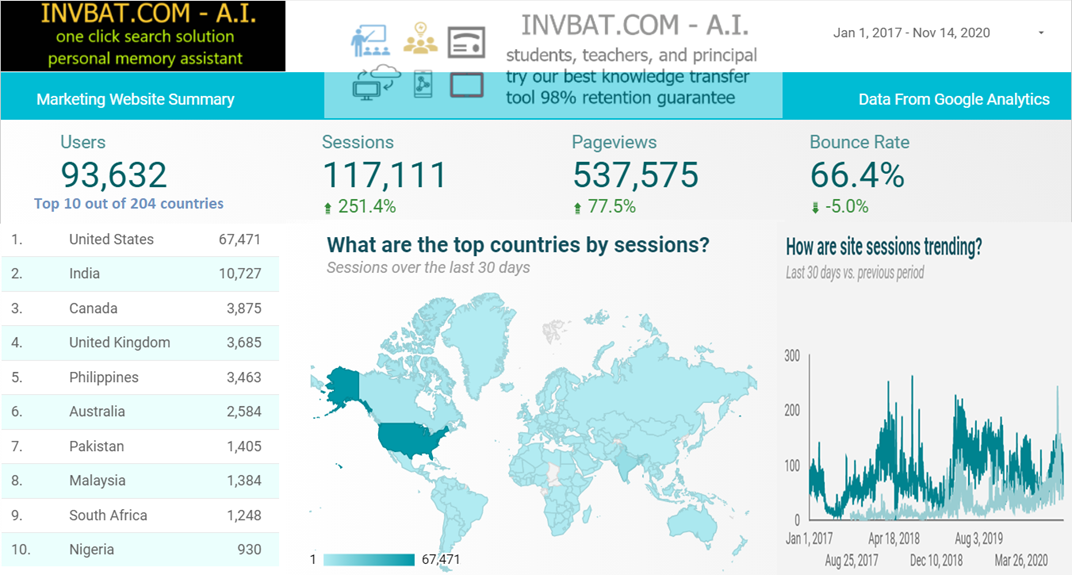
INVBAT.COM - A.I. is a disruptive innovation in computing and web search technology. For example scientific calculator help us speed up calculation but we still need to remember accurately the formula and the correct sequence of data entry. Here comes the disruptive innovation from INVBAT.COM-A.I. , today the problem of remembering formula and the correct sequence of data entry is now solved by combining formula and calculation and make it on demand using smartphone, tablet, notebook, Chromebook, laptop, desktop, school smartboard and company big screen tv in conference room with internet connection.
For web search , INVBAT.COM-A.I, is demonstrating that you can type text or use voice to text A.I. to search the web and get direct answer in one or two clicks. You don't need to waste your time looking from million of search results.